Featured
Posted by Ian Brodie on March 11th, 2015.
*** Please note, after many happy years with Membermouse I switched to using Memberium for Active Campaign. Membermouse is great, but because the integration isn’t native it just got a bit too convoluted tying everything together. With Memberium my membership site access is based on tags in Active Campaign so there’s nothing to sync – it’s all automatic and direct.
Here’s the old post in case you want to use Membermouse…
 I use two brilliant tools to drive the operations of my business. Membermouse for my membership site (and shopping cart) and Active Campaign for email marketing.
Historically, these two weren’t integrated together, so I built my own integration using Zapier.
As of Membermouse 2.2.6, basic integration with Active Campaign is built in. It’s pretty basic though: it allows you to add members to Active Campaign Lists.
If you want a more flexible solution, you can use the MM2AC (Membermouse to Active Campaign) plugin from Campaign Plugins available here.
It has much more advanced integration allowing you pass over Membermouse Fields (product details, customer details, and Membermouse Custom Fields) to Active Campaign when memberships or bundles are added. And you can trigger automations in Active Campaign when purchases or rebills are made or puchases fail.
It’s what I now use for integration myself.
If you want to buid your own integration using Zapier like I used to, you can still do so following the instructions below. But frankly it’s far easier to get the MM2AC plugin.
Integrating Membermouse and Active Campaign Using Zapier
There are many ways you could integrate the two, but for non-programmers, I’ve found the easiest way is to use the Email Push Notifications feature in Membermouse to hook in to Active Campaign via Zapier.

Membermouse can generate Push Notifications whenever key events happen on the system (e.g. purchases, cancellations, payment failures). These Push Notifications can either be a call to execute a piece of PHP code or in the simplest case they can simply be emails that get sent to wherever you want.
Zapier is a tool for connecting different applications together and passing information between them. There are literally hundreds of apps that are integrated in to Zapier but unfortunately, not Membermouse (although apparently that’s on the way). However, as long as your app can send emails (like Membermouse can with the Push Notifications) you can connect it to Zapier via the Zapier Email Parser.
The Email Parser reads emails sent to it and picks out specific sections in them and then passes the details in to Zapier.
Active Campaign is integrated in to Zapier, so you can set it up so that when the Email Parser receives an email from Membermouse indicating a specific action has happened (like a purchase) you can then add or update a contact record in Active Campaign to tag them or add them to an automation so they they receive emails (like a welcome email and follow ups).
Active Campaign and Membermouse are both so flexible that you can set up this integration in different ways depending on how you’ve configured your setup. These instructions will show you how I’ve set up my system. You’ll need to make adjustments to fit in with how you’ve set up your system.
How I Integrate Membermouse and Active Campaign
In my case, all my products (including my recurring subscription program) are set up as Bundles in Membermouse. All buyers are added to the same (free) membership level, but they get different bundles added depending on what they’re purchased.
That means that when a purchase is made via Membermouse on my site, it results in a “Bundle Added” Push Notification being triggered. If you’ve got your system set up to use membership levels instead you’ll need to use different Push Notifications (for example a Member Added notification). You’ll need to experiment to see what works best for you but you can use the same principles as I outline below.
Step 1 – Set up a Zapier Email Parser Account
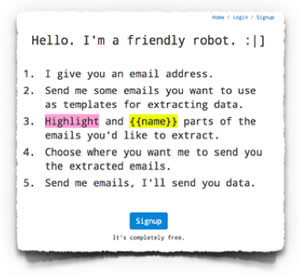 By default, as an Active Campaign user you get a Zapier account pre-integrated which you can access via the Apps Menu. However you don’t get an Email Parser account. Luckily it’s free, so you just have to set it up.
Head over to parser.zapier.com and you’ll get this screen where you can set up a new account.
 Once you’ve created your account you’re asked to create a mailbox. When you do that it’ll create a special zapier email address you can send emails to to read using the email parser.
You’ll then go to a screen where it gives you the email address of your new zapier mailbox which you can then send email to for it to parse. It’ll then wait for the first email to arrive so you can teach it how to interpret the email.

Next you’ll want to go to a different window on your browser and head over to your Membermouse installation and create a Push Notification email to send out when a purchase is made.
Step 2 – Set Up Your Push Notification Email
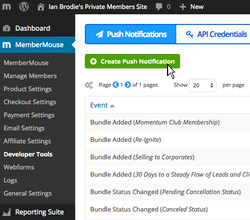 On your WordPress dashboard, select the Developer Tools section of Membermouse. Then click Create Push Notification to set up a new push notification.
This brings up a popup where you can select which type of event you want to create a notification for. In my case, because my products are set up as Bundles, I use the “Bundle Added” notification, so click on that. You can then specify which Bundle you want the notification set up for (you’ll be setting up a different notification for each Bundle) along with the email addresses to send the notification to. I send the notification to my own email address (so I’m notified of purchases) and I CC the notification to the special Zapier email address I set up in Step 1.
You then need to enter the subject line for the push email and curcially, the content of the email that will allow Zapier to parse it correctly.
For the email subject line I just use “Memberouse Bundle Added”. This bit doesn’t really matter for Zapier – just choose something notable that you’ll pick up on in your email inbox.
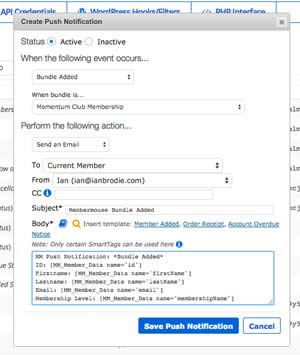 The contents of the email is the important bit. At minimum you’ll want to use this to tell Zapier which bundle has been purchased, and who has purchased it. For that you can use Membermouse’s shortcodes.
For my Bundle Added Push Notifications I use the following email body:
MM Push Notification: *Bundle Added*
ID: [MM_Member_Data name=’id’]
Firstname: [MM_Member_Data name=’firstName’]
Lastname: [MM_Member_Data name=’lastName’]
Email: [MM_Member_Data name=’email’]
Membership Level: [MM_Member_Data name=’membershipName’]
Status: [MM_Member_Data name=’statusName’]
Bundle: *Momentum Club Membership*
The really key data is the email and the bundle name. Zapier will use the email address to connect to the correct contact in Active Campaign. If the contact doesn’t exist, it’ll create a new one with the first and last name and email address specified.
Unfortunately, Membermouse doesn’t have a shortcode to show the bundle name. So in order to tell Zapier which bundle has been purchased you need to create a different Push Notification email for each bundle, and manually specify the bundle name in the email. The email above is for the bundle that gets added for my membership program Momentum Club. I surround the name with * * just to make it easier for the email parser to pick out the record.
Once you’ve set up your email notification you can move on to the next step.
Step 3 – Teach the Zapier Email Parser to Interpret Your Email
Now you have to teach the Zapier Email Parser about the format of your email so that it can feed the name, email address and bundle name through Zapier into Active Campaign.
First you’ll need to get the email sent to the email parser. The easiest way to do that is to add the bundle to a test contact you have in Membermouse. Either from your dashboard, or set up a product purchase to add the bundle and make a test purchase.
At a pinch, you could also manually create an email fitting the template in your normal email system and send it to the email parser, but you run the risk of transcription errors doing that so it’s best to actually send a real notification.
When you send the first email to the email parser, head back to the window where you set up the email parser mailbox and wait until it detects the email and takes you to a screen where you can teach it how to interpret the email.

What you do is highlight different elements of the email and tell the parser what’s in that section (you give it a field name you’ll refer to later in Zapier).
Zapier have updated the algorithm of the email parser over the years to be more accurate at picking out different elements of the email successfully. You may need to experiment with formatting your emails so that it’s able to pick out the details successfully. I’ve found that the classic version of the parser works best for me.
When you’ve specificed all the key fields – at minimum the email address and bundle name (and ideally the first and last names too), click on Save Address and Template and you’re good to go.
Step 4 – Map your Push Email into Active Campaign through Zapier
Now that Zapier can interpret your emails, you can map it in to Active Campaign.
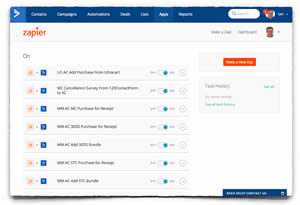 Open up your Zapier dashboard through the Apps section of Active Campaign. The select Create a New Zap.
Choose Zapier Email Parser as the Trigger app, and New Email as the trigger. This will run the Zap whenever a new email arrives to your Zapier inbox. Then select Active Campaign as the Action app and Add/Update Contact as the action to perform. Then click Continue.
Then you’ll need to select your Email Parser account using the email address you originally set it up with (not the email parser email address that it created for you to send the emails to). Pressing Continue will let you confirm your Active Campaign account as the account to send the details into.
You’ll then select the specific Email Parser mailbox to pull the data from (initially there’ll just be the one, of course). You can also apply filters to the Zap to only use emails that match certain criteria. I have a different Zap set up for each of my bundles, so I use this filter to decide which Zap to trigger by filtering on the bundle name field.
Alternatively you could run all your notifications through one zap and store the bundle name in a custom field.
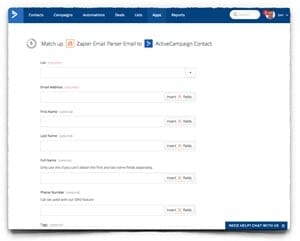 Next, you’ll specify which list to add the contact to (or update it in), the email address of the contact to use, and the other contact record fields you’ll map into. You’ll do that by selecting the list (Zapier will pull the lists from Active Campaign) and then specifying which fields from the email parser that you set up earlier.
Personally I have a special list set up for buyers of each my products but you could just use your main list and use tags to indicate purchases.
You can insert the data from the Email Parser by clicking the “Insert Field” button in the relevant section. This will return you a list of all the sections of data that the Zapier Email Parser has to offer. Some of these fields will be admin details about the email. The ones you’ll want to map will be the ones named “Parse Output nnn” where nnn is the name you gave to the field when you set it up in the Email Parser. For example “Parse Output Email Address” or “Parse Output Bundle Name”.
In this section you can also list the Active Campaign tags you want to add to the contact. I use this to indicate which bundle has been added with a tag like “Purchased Momentum Club”. Later on I’ll set up an Automation is Active Campaign to be triggered when this tag is added.
After setting this up you get a chance to test the Zap. If you select to do this it will pull the last data it received through the Email Parser (usually the test data you put in earlier when you added a bundle) and process it. You can use this to make sure you’ve got everything set up correctly.
Finally you can name your Zap and activate it and you’ll be ready for the final step.
Step 5 – Set Up an Automation to be Triggered by Your Zap
In the last step we processed the Push Notification email via Zapier and added (or updated) a contact in Active Campaign with the details of which bundle was added for them.
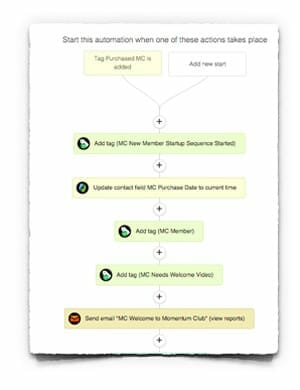 In this next step we’re going to trigger an automation. You’ll use this to make sure you new customers get a welcome email related to the bundle they’ve just purchased (or had added for them) and follow-up emails encouraging them to consume the content in your product. You’ll also want to tag the contact so you can broadcast them.
You just set up this automation like any normal automation is Active Campaign. Use “Tag is Added” with the tag you just set up in Zapier as the start condition of the automation and then put in all the steps you want your new customers to go through in sequence.
And that’s basically it. You’ve now integrated Membermouse and Active Campaign through Zapier so that when a bundle is added on Membermouse (usually via a purchase) the new member is added or updated as a contact on Active Campaign and put into an automation which then will email them, tag them, record the purchase date etc.
Further Thoughts
I’ve just described the basics of how I use Membermouse and Active Campaign together. It looks quite complicated when written out but it took me less than an hour to set it up from scratch the very first time. And that included lots of trial and error because I had no instructions like these – I had to make it up as I went along.
Your configuration might be different to mine, of course. You might use membership levels instead of bundles for example. So you’ll have to test out different options to get it to work for you. But it all basically works in the same way: figure out which Push Notifications are generated when your customers buy. Put the details that you need into those notifications using shortcodes or hardwiring them. Train the email parser to read your emails. Then connect in to Active Campaign using Zapier and trigger an automation to set everything else up.
You could probably do something more efficient if you thought about it. I use a different zap per bundle, but you could feasibly use one zap and just differentiate between bundles or memberships using a custom field in Active Campaign.
I’ve also set up an integration for when my subscription bundle is cancelled too. There’s a pending cancellation notification email when the bundle is cancelled with time left in the current subscription period. This triggers an email to the customer thanking them for their time in the program and asking them to complete a cancellaton survey. There’s then a push notification email when the bundle is completely cancelled at the end of the period and that then triggers another email and the removal of their membership tags in Active Campaign.
I’m sure you could think of other things you could do too. For example, currently Membermouse sends out my “dunning” emails if credit card payments fail. But you could run that through Active Campaign via a push notification and that way you could tell if the customer had opened or clicked the email.
So plenty of options once you get the hang of programming these emails from Membermouse through the Email Parser into Active Campaign.
The links at the start to Active Campaign and Membermouse are Affiliate links. Both are systems I use myself to run my business and I thoroughly recommend
By the way, my Active Campaign review is here.
 Ian Brodie on March 17th, 2015.