
Whitelisting Instructions

You’ll need to whitelist my email address to ensure you receive the emails and other goodies you’ve signed up for. Spam and other filters are very aggressive these days and sometimes mark emails as spam or promotional even if you’ve signed up to get them.
The best way to ensure you get the emails you signed up for is as follows:
Firstly, if you can’t see an email from me at all, check your spam folder and if you see it in there mark it as “not spam”.
Then for Gmail:
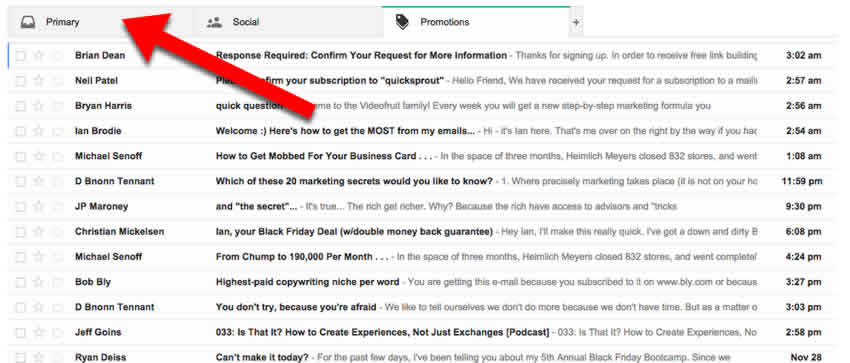
- In your inbox, look for an email from ian@ianbrodie.com (for example, the welcome mail you got when you signed up). You may have to look on different Gmail tabs like the Promotions tab.
- Drag this email to the “primary” tab of your inbox.
- You should now start receving my emails into your primary inbox :)
For Gmail and other email service providers (Hotmail, Yahoo, AOL, etc.) please also add my email address (ian@ianbrodie.com) as a contact in your address book. You can find more detailed instructions here.
Thanks!
– Ian

Ian Brodie
https://www.ianbrodie.comIan Brodie is the best-selling author of Email Persuasion and the creator of Unsnooze Your Inbox - *the* guide to crafting engaging emails and newsletters that captivate your audience, build authority and generate more sales.